Add the below code in a View and run the application.We will go over the fundamentals of MVC in this post. The concepts of MVC and examples of one Controller, one Model, and one View or several were found in the majority of the MVC articles. We'll talk about the prerequisites for implementing an MVC application here. Are Controller, Model, and View all required? Is it possible to create an MVC application with just a model, controller, etc.? This will enable us to comprehend the true connection between these three MVC components.

We'll talk about this while writing the code for a brief real-time issue statement. After we've finished writing all of the code, we'll also rapidly grasp the theory. Indeed, the hypothesis will be presented at the conclusion.
We will use an empty MVC web application that Visual Studio provides to demonstrate the code base, and we will add the necessary code.
Statement of the Problem
Now, let's look at a very basic example (but the topic is applicable to all MVC apps, regardless of size). Let's say we have a requirement that requires us to either construct an MVC ContactUs page or add this page to an already-created MVC application.
Now consider: Do we require a controller? Yes, is the response. An HTTP request will be sent to the application via the controller. Thus, we are unable to prevent that. We realize that in order to build an MVC application, controllers are always required. For the time being, put the Model and View on hold and begin working on the Controller. We will talk about them in a similar manner.
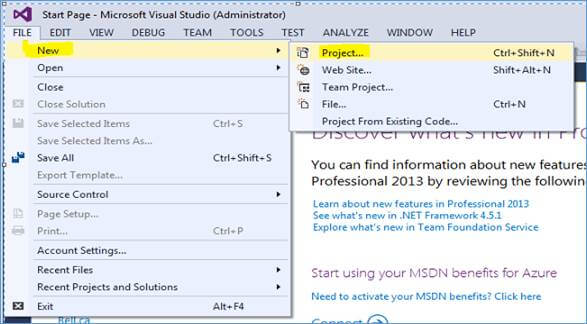
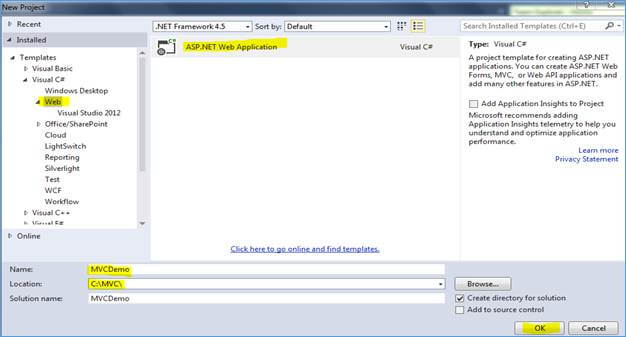
Launch an MVC application by following the instructions below:
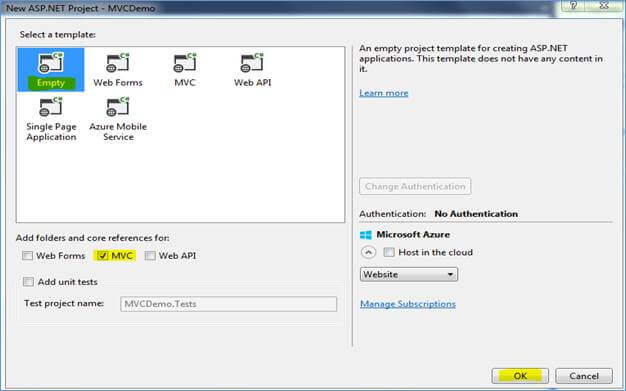
Click OK after choosing "Empty" as the template and "MVC" in the folder references. No other options need to be changed. This will provide you with a pre-made MVC folder structure without a Controller, Model, or View. We shall make those from the ground up.
Understanding the Controller
We have already discussed that Controller is essential. But, is a Controller alone is enough to create a MVC application? Again, the answer is, YES, at least in some scenarios.
Now suppose, you get a requirement twist; the company is getting their addresses changed and for now, we just need to display “Page is under construction” on ContactUs page.
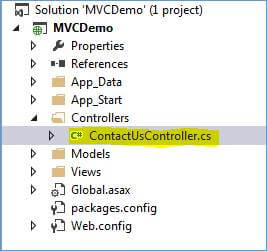
Let’s achieve this through only a Controller. Create a Controller class ContactUsController.cs in Controllers folder, as shown below:
Add the following code in this file.
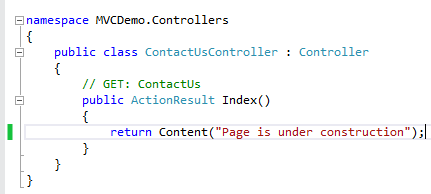
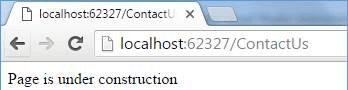
Run the application and see what we get. We get the following screen.
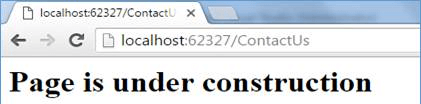
We can even return the HTML with a little code change. Use the below code instead and browse the page. Return Content("<h1>Page is under construction</h1>", "text/html");
We will now get this screen.
So far, we learned that the Model and the Views are not necessary to create an MVC application. A Controller can be enough in some scenarios, as discussed above. Now, let’s bring the View into the picture.
Understanding the View
View can also be used with or without Model. Let’s first use View with no Model associated with that and later, we will discuss about Model.
Now, let’s say, you get another update in requirements that for now we need to show only one office detail. So, we need to show only one address, city, country, and contact number on contact us page as a table. As we need to add a table and some other styling, let’s use a View to achieve this. And, because we just have one static data, we can easily add that in the View itself with no Model.
Inside Views/ContactUs folder, add Index.cshtml, as shown below:
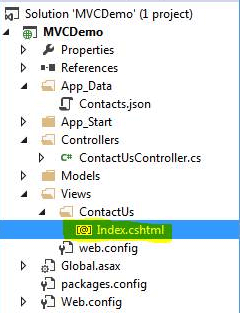
Add the below code in a View and run the application.
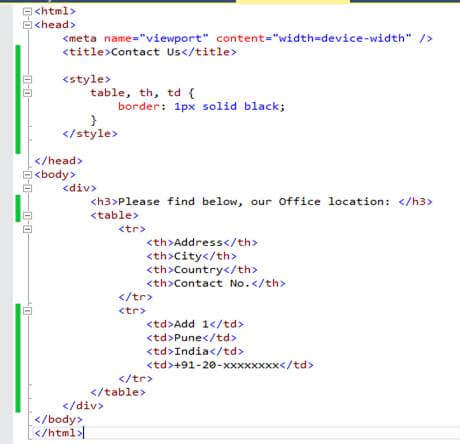
In the above code, we just created a table and fixed the data in View itself (because it’s a single fix data). Also, in earlier code, we return a small HTML from our Controller itself. Let’s change that code to the following:
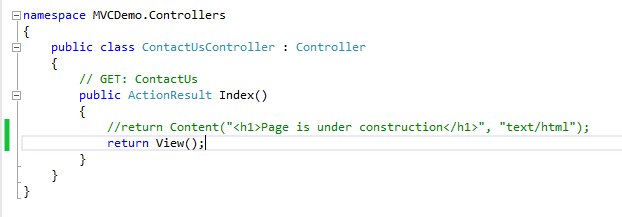
When we run the application.
Understanding the Model
Now that we are done with Controller and View, let’s discuss the limitations with not having a Model. Imagine, there is another addition in the requirement which says that we need to show all the addresses (3 as of now) of our offices, and the company will add a new address every month. In this situation, we have to have a database where addresses will keep on adding and we have to show all these addresses in our View dynamically. This is substantial work if done in a View. Let’s bring a Model in the code to make it easier and more dynamic.
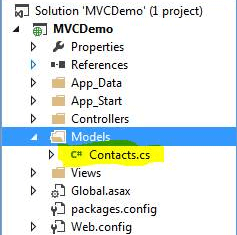
Add a modal class “Contacts.cs” in Models folder.
Add the below code in this class.
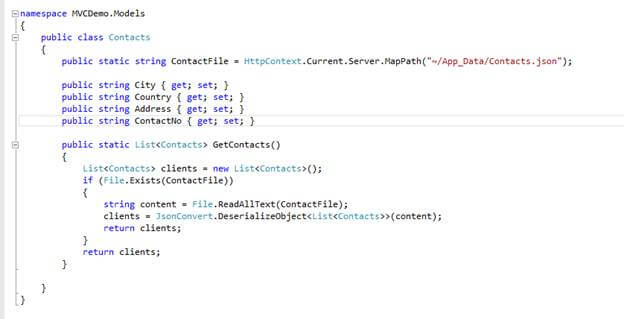
In our Model, we have 4 properties (City, Country, Address and ContactNo) which our complete office address contains. Notice, we are using a Contacts.json file as a data source here. In reality, it can be a database, a service, or a file itself whatever suits the project.
Inside GetContacts function, we are just fetching the address detail from JSON file, creating a list of Contacts, and returning a very simple modal class, fetching the data from a flat file and returning the same.
To add a JSON file, add a file “Contacts.json” in Appdata folder and add some data in to it. Now, our Model is also created. Let’s use it with some minor changes in our Controller and View. Update code as the below one and run the application.
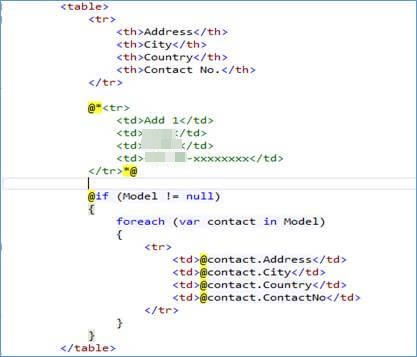
Inside View, first add Model reference, as given below:

Now, comment the static data present inside the View and add the logic to show the data from the Model, as shown below:
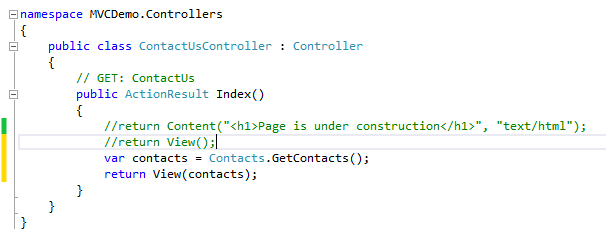
Also we needed a minor change in Controller. We need to populate the Model with data using the function we just created inside model class. And then, pass this model object to the View, so that the View can use it and show the dynamic data on screen. This is simple. Just make the following changes in Controller class:
Now, run the application again. We will get the same screen but now with dynamic data.
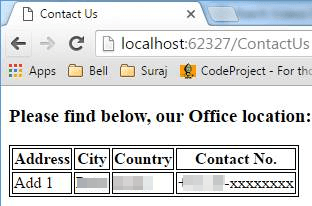
Just add more data in JSON file and refresh the page. All the data from the JSON should be visible on screen with no code change. As an exercise, you can now try to add some more data in the JSON, add some more properties to the contact us, and do some more styling to make it better.
Summary
Now that we have seen all the code, here are few theory points we learned:
- Controller is essential. This is a must in an MVC application. Don’t avoid that..:)
- Controller is responsible for returning the View to the caller and if “How” part of the data is small or insignificant, it can take “How” responsibility as well.
- View is responsible for “How” to show the data. But if “What” part of the data is small or insignificant, it can take “What” responsibility as well.
- Model is responsible for “What” part of the data. It's Model’s responsibility to get or create the data. It can fetch the data from any data source, manipulate it if required, and return that to the Controller. Controller then passes that to the View, so that the View can use that.