
May 20, 2026 09:56 by
 Peter
PeterView Engine is responsible for rendering the view into Html form to the browser. ASP.NET MVC supports web form(.aspx) and Razor View (.cshtml). View Engine is used to convert html+Programming language to pure HTML.
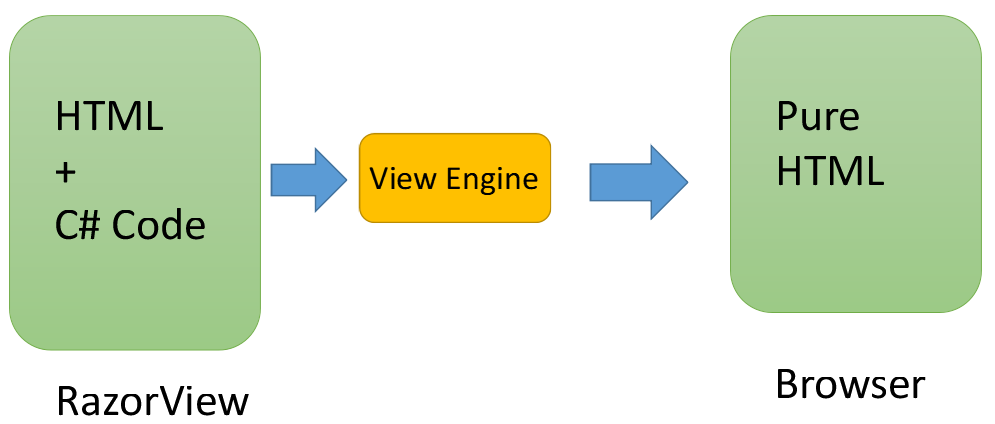
You can see that a view can include both HTML and C# code in the diagram above. The C# code written on the view is transformed into pure HTML format when the view renders in the browser. ViewEngine's role is to translate C# code into plain HTML. If you are unable to locate the C# code on the browser, you can cross-check by looking at the browser and confirming the C# data.
Why is View Engine required in ASP.NET MVC 5?
- View engine is responsible for creating HTML for View
- It converts html+Programming language to pure HTML
- It is used to find the corresponding view for the action method.
- It is used to find a View from the shared folder.
- We used to write C#/VB code on View
- View Engine is required to implement the strongly-typed View.
What is Razor Engine In MVC 5?
- Razor Engine is an advanced view engine.
- This is not a new language but it is a new markup syntax.
- The namespace for Razor Engine is System.Web.Razor.
- View file extension is .cshtml or .vbhtml (partial and layout view) based on language.
- Razor syntax is easy to learn and much cleaner than Web Form syntax.
- Razor Engine prevents XSS attacks(Cross-Site Scripting Attacks)
- Razor Engine does not support design mode in VS means you can not see your view page look and feel.
- Razor Engine supports TDD. It does not depend on System.Web.UI.Page class.
What is Razor Syntax in MVC 5?
Two types of Razor syntax,

- Single statement block: It starts with @.
- Multi statement block: It starts with @{..............}
It must be always enclosed in @{ ... }
The semicolon “;” must be used to end statements
Inline expressions (variables and functions) start with @
Example of Single block
A single statement block is used when a single line of code needs to write on View.
Example
To display current DateTime.
Create Index.cshtml View and add following code. If you new with creating an application in ASP.NET MVC 5 then go with following links.
Create ASP.NET MVC Application using Visual Studio
@{
ViewBag.Title = "Index";
}
<hr />
<div>
<label>Current Date : @DateTime.Now.ToString()</label><br />
<label>Current Long Date: @DateTime.Now.ToLongDateString()</label><br />
<label>Addition of Numbers: @(250 + 250)</label>
</div>
Inspect browser and search “DateTime.Now.ToString()” on browser; we cannot find the C# code on the browser as follows.
If you inspect browser and search “DateTime.Now.ToString()” on the browser, it could not see the C# code on the browser; we can only see the pure Html code. This is the job of View Engine to convert C# code into pure Html format on the browser.
Example of Multi statement block
In multi-statement block, we can write more than one line of code as follows.
@{
var num1 = 100;
var num2 = 200;
var num3 = num1 + num2;
string message = "Welcome to ASP.NET MVC Tutorials.";
}
<label>Addition of two Num is = @num3</label><br />
<label>@message</label>
Comments in razor syntax in MVC
Two type of comments,
Single Line
Example: // code.........
Multi-Line
Example: /* code........ */
Single Line comment Code,
//var num1 = 100;
Multi-Line comment Code,
/*var num1 = 100;
var num2 = 200;
var num3 = num1 + num2;
string message = "Welcome to ASP.NET MVC Tutorials.";*/
Escape sequence in Razor syntax in MVC
Razor syntax always starts with “@” then how can we use “@” symbol on the browser?
If you want to print your Twitter account on the browser then we need the help of escape sequence. If we want to print “@shrimant_vt” then we need to write double at the rate symbol like “@hostforlife”.
Example
My Twitter Account = @hostforlife
First, we will not use an escape sequence in razor syntax to display the Twitter account.
Code
<label>My Twitter Account = @hostforlife</label>
After executing the application you will get the following error message.
Compiler Error Message
CS0103: The name 'hostforlife' does not exist in the current context